# Migrating a Blazor WebAssembly app to .NET 5
I have a small side project made with Blazor WebAssembly and although it's great for my needs, the debugging experience is very poor. Lucky for us, this was greatly improved in .NET 5 and I wanted to try it out immediately. The migration was quite easy but I did encounter some issues, so here are the steps you have to do to to upgrade your app and then we'll go over the issues:
## Migration
1. Install [Visual Studio 16.8](https://devblogs.microsoft.com/visualstudio/visual-studio-2019-v16-8/)
2. Change the first line in your Blazor WebAssembly project from
```
Microsoft.NET.Sdk.Web
```
to
```
Microsoft.NET.Sdk.BlazorWebAssembly
```
3. Change target framework to .NET 5
```
netstandard2.1
```
becomes
```
net5.0
```
4. Update other packages to `5.0.0` (`Microsoft.AspNetCore.*`, `System.Net.Http.Json`, `Microsoft.EntityFrameworkCore`, etc.)
In the end, this is how my diff looks like for a fresh project ([click to open in a new tab](https://cdn.hashnode.com/res/hashnode/image/upload/v1605139050446/v8GMkgpP9.png)).

## Errors
If you have any errors, there are some things you can try:
1. Remove `Microsoft.AspNetCore.Components.WebAssembly.Build` from your project
2. Remove the properties
```
browser-wasm
```
and
```
true
```
3. If the build still fails, do the usual routine in Visual Studio:
- Clean solution
- Close Visual Studio and delete the bin/obj folders
- Delete the .vs folder
- Open Visual Studio and build the solution again
## Azure App Service
If you're using Azure App Service, then you can deploy your Blazor app immediately because .NET 5 is already supported. However, if you just deploy your Blazor app after upgrading to .NET 5 then you'll encounter this error:
> The specified version of Microsoft.NetCore.App or Microsoft.AspNetCore.App was not found.
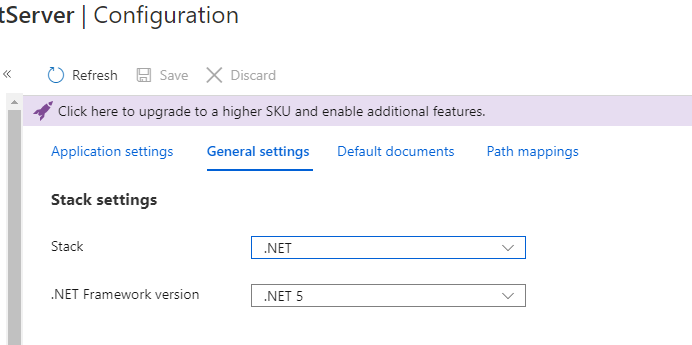
To fix it, you just have to go to the App Service Configuration page and change the Stack from `.NET Core` to `.NET` and the .NET Framework version to `.NET 5`. It should look like this in the end:
That's it! Now you can take advantage of all the goodies that Blazor has to offer with .NET 5
PS: I tried the debugging experience and indeed, it's way better now :)